
College Stuff
Screencast: Using gdb to view asm code and CPU registers
by admin on Feb.23, 2014, under College Stuff, Linux
My first (kind of cheesy) screencast using asciinema to show how easy it is to use gdb to view the asm code for a trivial C program and view the status of CPU registers, etc. I think it helps to learn gdb earlier rather than later, and thought it might be fun to use it to show some of what we are now covering in the class lectures and book (data path, registers, memory fetch / store, basic asm commands, etc.)
The embedded player cuts off a bit as my terminal was extra huge, but you can use the above link if you want to see the comments in full.
It also shows a few basics of navigating and controlling gdb’s text user interface, which is a feature well worth knowing about.
Provided you compile C code with -g (gcc) or asm code with -gstabs (as) you can use gdb on the resulting binary.
Dropbox on Suse 11.1 with KDE
by admin on May.25, 2009, under College Stuff, Linux
Dropbox is a service which allows you to easily share and synchronize files across several computers and mixed platforms. The client is available for Linux, OS X and Windows. Once installed, anything placed in your Dropbox folder on one machine is synchronized with the other – your most recent version is thus always on all systems using Dropbox and also via your web accessible storage account.
If you like, download it from here as doing so will give you (and me) and additional 250MB of space in addition to the 2GB you already get.
For me, this is a wonderful tool. I can place all my papers for school, research notes from work, to do lists, etc. in one location and have them always available no matter if I am at work, home or out and about on my UMPC. Additionally, if you sign up for the beta you get 2 Gigs of space on your web account for free, should you need more you can buy additional space at reasonable prices. Also, you can use it for version control so in addition to simply sharing files you can revert to previous versions. Definitely a great tool.
What about using it with KDE?
As it is still in development there is not a native KDE client. The existing tools are centered around Gnome. My solution was to install the dropbox tool using the generic Linux binary package and manually copy some files around.
Ordinarily you would then start dropbox from Gnome and create your account, etc. As I was not running Gnome I discovered this post which provides a simple means of launching the account creation dialog. Just download the client tarball (change to x86_64 for 64 bit) , extract it and move the .dropbox-dist to your home directory and then execute ~/.dropbox-dist/dropboxd & to start the daemon which will launch the account creation wizard too. (Don’t download the source code from the site, download the binary using the above link.)
To automatically start the syncronization daemon at login, just symlink it as:
paracelsus@Callandor:~> ln -s ~/.dropbox-dist/dropboxd ~/.kde/Autostart/
Now, anything placed in your /home/Dropbox folder will be synced!
Should you wish, you can also install nautilis and its dependencies and use it that way – but there is really no point. Just put things in your drop box folder and if the daemon is running it will be synced with your web account and other systems. Done. You can check how much space you have left by logging into your web account.
There is a project working on a KDE client so you will get fancy desktop notifications, implement the version control, etc. – but you certainly don’t need to wait for it to take advantage of this now under KDE.
Cheers,
Pete
O3Spaces – Open Office and MS Office Collaboration
by admin on Jan.30, 2009, under College Stuff, Linux
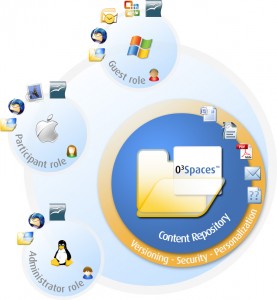
Recently at school an issue once again reared its head, and of course needed to be solved with Linux.
You see, my school – St. Petersburg College – uses softwares for on-line classes that is very limited. One of the most significant things it lacks is any ability for students to collaborate on projects. The most it offers is private discussion boards, but no ability to collaborate on papers, etc. This makes it extremely difficult for a team to work on a paper or outline together. The only ready options were to use FTP or Google docs. FTP is not realistic for lay users, too unwieldy, no version control and no file lock out method, etc. Google docs is okay, but I wanted my own solution and there are those whose opinions make them not wish to use Google docs – data mining, etc.
A quick look on Wikipedia found a good article comparing group ware and collaboration software and this lead in turn to O3Spaces. This is a pretty interesting application. While not open source there is a community edition available which allows up to 10 users to collaborate.
Of particular interest to me was the cross platform capabilities it offered. Users of both Open Office and Microsoft Office can download a desktop connector that allows them to edit documents and sync them with the O3Spaces server. As most classmates use Windows, while I use Linux and Solaris, this was perfect. (There is also a client for OS X as well, so you definitely have your bases covered here.)
Adobe CS3 Trials Unavailable
by admin on Oct.18, 2008, under College Stuff, IT Adventures
Recently Adobe removed the trials for their CS3 line of products. While trials for the new CS4 versions are planned to be released mid November, this leaves you a bit high and dry for now.
(CS4 trials are now available, but often for classes you need a bit more that 30 days, and it is really inconvenient to have the trial run out mid class. Following the steps below will allow you to bide some time so you can finish your class and eventually buy the Adobe products you need.)
As I am taking a college class for Dreamweaver during this surprise moratorium, I found this most annoying. So if you are in a similar boat, your options are:
Download the beta version of the CS4 product at here :
Update2 – OSX CS4: Since originally posting this I had to later repeat these step with Photoshop CS4 for Mac. The step are essentially identical — using a key to allow the install to complete and then simply redirecting network connections which attempt to connect to the Adobe licensing server by adding one line to your /etc/hosts file in OSX:
127.0.0.1 activate.adobe.com
I used the keygen provided by soadfreak2005 in a torrent I found here. This torrent includes screen shots and a detailed guide and has two keygens, one of which provides valid keys for both Windows and OSX.
Also, unlike the CS3 windows version – do NOT remove the Adobe PCD\cache directory or it contents, or change permissions on that folder. This will result in Photoshop failing to start with a message to reboot and contact Adobe support. You can simply leave those files alone, use the keygen and redirect network connections to Adobe as above, this is all that is required.
Update: What a pain in the ass man. I verified you can install this. However, you must remove this file before you run it and then enter the key below. So download it, install it and then before running it remove this file:
C:\Program Files\Common Files\Adobe\Adobe PCD\cache
Then run the program, it will ask you for a key. Use this key:
1192-1413-8739-4724-1366-4303
Now . . that still likely is not enough. The file you removed gets recreated. CS4 has a nifty registration program that looks for an active internet connection and them randomly launces the registration tool and checks your key. If your key is found to be invalid you have to delete the cache file again as above and re-enter the key. You will continue to have this problem.
Cross Platform Geekness
by admin on Aug.31, 2008, under College Stuff, IT Adventures
I rather get off on making apps run on things they were never meant for. It’s just good fun.
Last semester I had to use this “Windows only” program called Visual Logic for a class. I got it to run under wine easily enough and used it for the duration of the class.
Now Sydney is taking that same class but she wanted to run it under OSX on her Mac. Okay, no problem – mostly.
Using X Forwarding I set up a script that sets her local $DISPLAY variable (which does not get set automatically in OSX terminal), sets up Xquartz rather than the regular OSX X11 server to run correctly, logs her into my Linux box (using ssh key authentication) and then runs wine and the Visual Logic program which is in turn X forwarded over SSH and displayed on her OSX screen. Bwah ha ha . . .
I turned this into an executable script on her OSX Desktop – learning that OSX needs a .command suffix to make such click executable.
And viola – it actually works, well – mostly. The Windows “File Open” window is rendered without text (nice) and the screen refresh in Visual Logic itself is pretty crappy when you X forward it. But it does actually run.
And here is the little beastie. Should you need to X forward any apps to OSX you may find it useful:
$cat VisualLogic.command
#!/bin/bash
export DISPLAY=:0.0
/usr/X11R6/bin/Xquartz -xinerama&
ssh -X [email protected] wine /home/paracelsus/Desktop/VisualLogic-Course-2.2.exe
In order to make wine run automatically I just appended the remote command to run onto the end of the ssh command.
I found this site, which held the secret to the Xquartz server secret. Also, here is a good Apple site on X forwarding and the X11 server in OS X. You have to install Apple’s X11 server from your OS CD or download it for any of this to work – I have a bit more info on that on my OSX Darwin wiki article.
Even though it is a bit clunky, it was still fun taking a Windows app, running it under Linux and X forwarding it to OS X. Now that is just kind of fun.
