
Archive for October, 2008
Firestats Rocks the House
by admin on Oct.29, 2008, under Linux

I’ve been using a stats plugin for Worpress and it has done a good enough job, but I recently found myself looking for a stats reporting plugin for my Wiki as well. I have added a lot of articles over the last year and was curious to see exactly how many hits it gets.
Googling around quickly led me to Firestats. What a wonderful product. It allows you to centrally managed stats from several applications such as MediaWiki, WordPress, Joomla, Drupal, etc. and manage multiple instances of these very easily. See their page on multiple sites for more information. Additionally you can use this on any generic PHP page, which is a great feature.
The stand alone installer worked extremely well. After Firestats is installed you can follow the directions on how to add a database and then use the plugins for a variety of applications. Follow the instructions for these plugins very carefully and before you know it you will have stats pages for all your separate sites you wish to monitor.
The Firestats interface is quite nice, with graphical representations for visitors browser types, OSes, country flags for their origin IP, etc. The interface is quite nice.
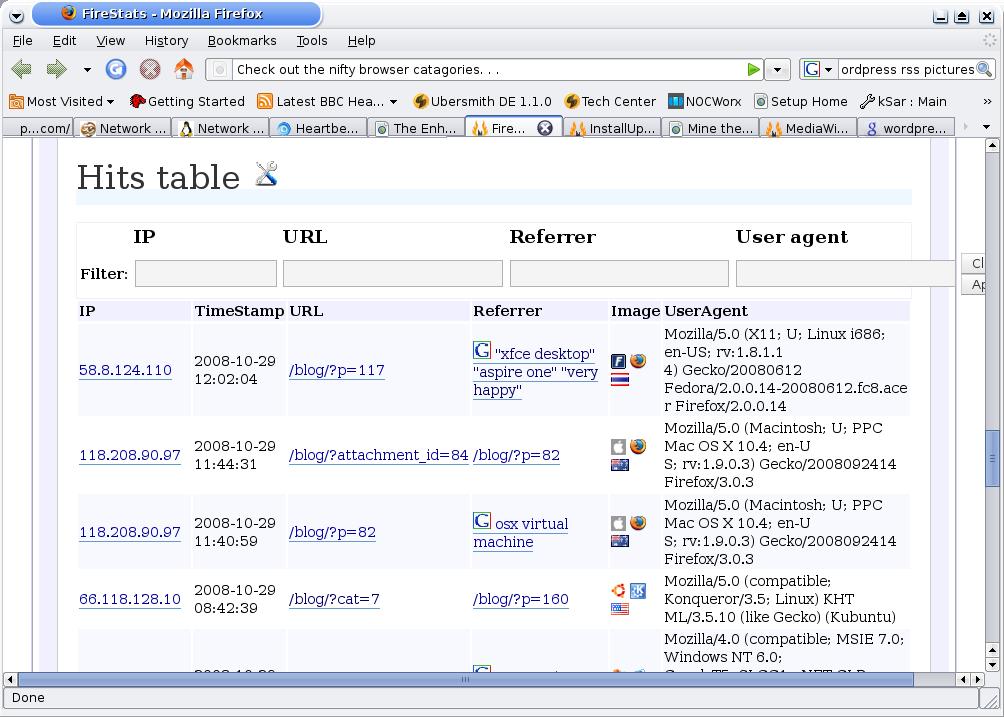
Here are a few screen shots, but it really is far more impressive that these show. This one shows the hits page, with icons for the visitors browers, OS and country along with the Goolge or other referring link. Very geeky undoubtedly.
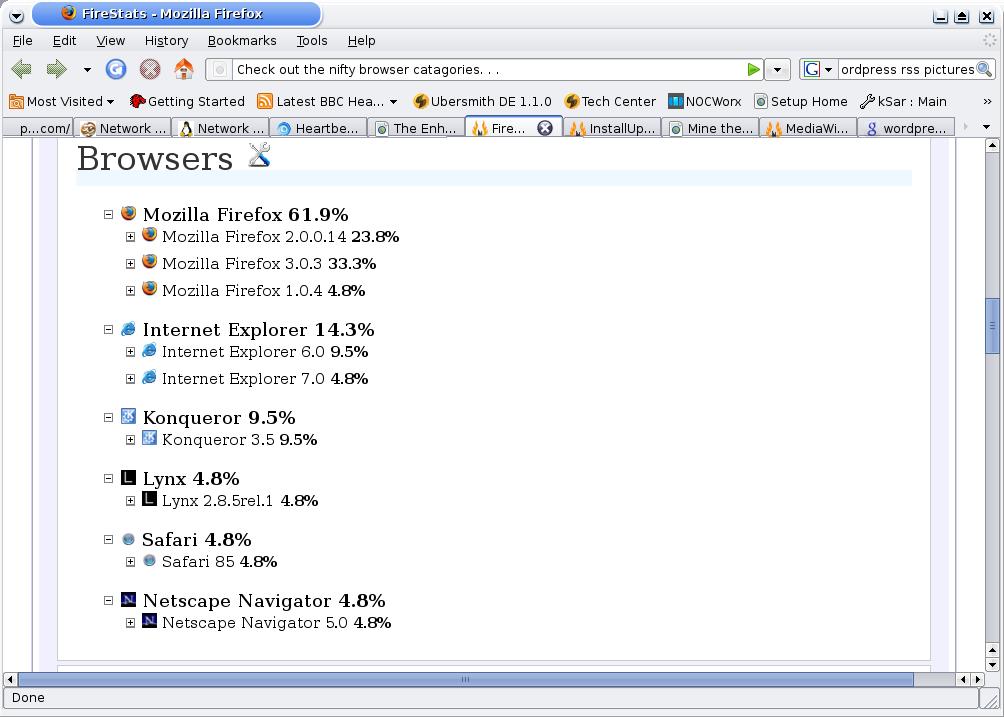
This one shows the categories of browsers and versions. There are also categories for OS versions and countries too:
If you are looking for stats software for you site, I would highly recommend this. It seems quite versitle. I am going to look into and see if there are extended graphing and reporting capabilities, but all the data is just stored in a MySQL database, so you can easily do with it as you will.
Sago Labs – Welcome!
by admin on Oct.28, 2008, under Sago Labs
My company, Sago Networks, is launching a new section to our website – Sago Labs. I’ll be contributing to this via my blog and posting interesting bits on what behind the scenes projects I am involved with to let others know some of the interesting things we have cooking in the kitchen and sharing this with the community.
Here you will find information on ongoing research projects and results, new technologies we are exploring, and general Geekness in the Superlative. Also, you may get a comment or two on Sago culture, people and events – as it is a rather colorful place to work and there is always something interesting or funny afoot.
Watch the RSS feed for more to come!
Cheers,
Pete Eby
MySQL Server and Intel Compiler
by admin on Oct.23, 2008, under Linux, Sago Labs
Hot on the heels of the last post on the Intel C Compiler for Linux, a colleague pointed out this MySQL developer post which talks about compiling MYSQL with different options and compilers to obtain performance improvements.
I Googled around, thinking that perhaps there may be some information from people who have specifically tried to compile the MySQL daemon with the Intel Compiler (ICC). Indeed I found quite a bit. Here is an extremely interesting presentation giving MySQLd benchmarks from compiling with ICC. Although this is based on earlier versions of ICC and MySQL, it is quite likely similar performance benefits could be seen with current versions.
Further looking about I discovered that MySQL binaries compiled using ICC for a variety of platforms are available for download directly from the MySQL Developer site. Just look in the downloads section and you will see the ICC versions available.
This makes it extremely simple to expiriment with these versions and benchmark them to see if they may be useful in a production environment.
Intel C Compiler for Linux
by admin on Oct.22, 2008, under IT Adventures, Linux, Sago Labs

Tux Rocks

Atom Inside
Recently I learned that Intel makes its professional C compiler for Linux available for free. I discovered this fact at this blog, the writer of which extolled the virtues of the Intel C Compiler (ICC) and how the binaries it creates can run faster than those compiled with the GNU C compiler (GCC) – up to 35% faster. The author gave some test results of benchmarks created using Crafty, a chess engine.
Well – all this seemed pretty interesting to me! Using Crafty seemed a great idea, chess engines being so computationally intensive. Crafty also has an apparently undocumented benchmark function, so this is perfect.
Of course I am familiar that different compilers, compiling options and optimizations can effect the performance of the resulting binary, but I have never personally compared these results. And the potential for such significant gains was too tempting to pass up. Plus I could experiment with the Atom specific optimization flag. A veritable candy store of geekness.
I decided to duplicate that authors test, using the Intel and GNU compilers to compile Crafty and generate some benchmarks. My results were quite comparable to his, in fact the ICCC benchmarks were a bit better.
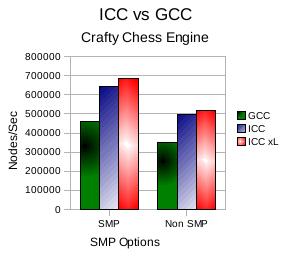
Here you can see the comparison between the GCC and ICC versions, and well as a third option showing an ICC version compiled with the -xL optimization flag for the Intel Atom.
In Crafty there was a slight improvement compiling with the -xL flag specifically for the Atom architecture. However, there is a significant difference between the ICC and GCC versions as you can see:
Compiler Comparison
The substantial improvements available through compiling using the Intel C compiler clearly show it should be used when possible, particularly on computationally intensive applications.
Installing ICC is quite straightforward. Ensure you have GCC and G++ (called GCC-C++ in some distro packages) as these are required. Then just run the install script.
The specific Makefile options I used to compile each of the above three versions can be found on this Wiki article I wrote on Crafty – I did have to experiment with these a bit to get the ICC version to compile correctly. I also have a page on the Intel Compiler specifically here.
Have fun test driving this for yourself and please comment your tests and findings, I would love to hear about them.
Adobe CS3 Trials Unavailable
by admin on Oct.18, 2008, under College Stuff, IT Adventures
Recently Adobe removed the trials for their CS3 line of products. While trials for the new CS4 versions are planned to be released mid November, this leaves you a bit high and dry for now.
(CS4 trials are now available, but often for classes you need a bit more that 30 days, and it is really inconvenient to have the trial run out mid class. Following the steps below will allow you to bide some time so you can finish your class and eventually buy the Adobe products you need.)
As I am taking a college class for Dreamweaver during this surprise moratorium, I found this most annoying. So if you are in a similar boat, your options are:
Download the beta version of the CS4 product at here :
Update2 – OSX CS4: Since originally posting this I had to later repeat these step with Photoshop CS4 for Mac. The step are essentially identical — using a key to allow the install to complete and then simply redirecting network connections which attempt to connect to the Adobe licensing server by adding one line to your /etc/hosts file in OSX:
127.0.0.1 activate.adobe.com
I used the keygen provided by soadfreak2005 in a torrent I found here. This torrent includes screen shots and a detailed guide and has two keygens, one of which provides valid keys for both Windows and OSX.
Also, unlike the CS3 windows version – do NOT remove the Adobe PCD\cache directory or it contents, or change permissions on that folder. This will result in Photoshop failing to start with a message to reboot and contact Adobe support. You can simply leave those files alone, use the keygen and redirect network connections to Adobe as above, this is all that is required.
Update: What a pain in the ass man. I verified you can install this. However, you must remove this file before you run it and then enter the key below. So download it, install it and then before running it remove this file:
C:\Program Files\Common Files\Adobe\Adobe PCD\cache
Then run the program, it will ask you for a key. Use this key:
1192-1413-8739-4724-1366-4303
Now . . that still likely is not enough. The file you removed gets recreated. CS4 has a nifty registration program that looks for an active internet connection and them randomly launces the registration tool and checks your key. If your key is found to be invalid you have to delete the cache file again as above and re-enter the key. You will continue to have this problem.
